


 Bigeasyseo
10 Common On-Page SEO Mistakes That Are Hurting Your Google Rankings


Most business websites lose rankings and traffic because of avoidable on-page SEO mistakes. Issues like duplicate title tags, keyword stuffing, missing alt text, thin content, and slow page speed quietly undermine your visibility on Google. Identifying and correcting these errors is often the fastest path to improved organic performance without spending more on advertising.
Why On-Page SEO Mistakes Cost You More Than You Think
On-page SEO mistakes silently drain your website’s ability to attract search traffic. Many business owners invest in web design and paid advertising without realizing that basic optimization errors are preventing their pages from ranking. Fixing these mistakes does not require a complete website overhaul. In most cases, targeted corrections produce measurable improvements within weeks.
The following ten mistakes appear repeatedly on business websites across every industry. If your site is not performing as well as you expected in search results, one or more of these issues is likely the cause.
1. Keyword Stuffing
Keyword stuffing is the practice of unnaturally cramming a target keyword into your content as many times as possible. A decade ago, this tactic could help a page rank. Today, it actively hurts. Google’s spam detection systems flag keyword-stuffed content, and readers bounce away from pages that read like they were written by a machine.
How to fix it: Use your primary keyword in the first 100 words, the H1, one or two H2 headings, and naturally throughout the content. Modern research confirms that exact-match keyword density has virtually no correlation with rankings. Focus on covering the topic thoroughly instead of repeating the same phrase.
2. Duplicate or Missing Title Tags
When multiple pages share the same title tag, Google cannot determine which page to rank for a given query. Both pages end up competing against each other, and neither performs as well as it should. Missing title tags are equally damaging because Google is forced to generate one from your page content, which rarely represents the page effectively.
How to fix it: Give every page a unique title tag that includes the page’s primary keyword and stays under 60 characters. Audit your site with Google Search Console or a crawling tool to identify duplicates. For details on writing strong title tags, see our guide on title tags and meta descriptions.
3. Thin or Low-Quality Content
Pages with fewer than 300 words, content that rehashes what ten other websites have already published, or pages that provide no genuine value to the reader consistently underperform in search results. Google’s Helpful Content system specifically targets pages that exist only to rank rather than to serve the user.
How to fix it: Every page should provide comprehensive, original information that satisfies the searcher’s intent. Service pages should explain what you offer, who it is for, what the process looks like, and why your business is the right choice. Blog posts should cover their topic with enough depth that a reader does not need to search elsewhere. Read our guide on writing SEO-friendly content for a detailed framework.
4. Ignoring Search Intent
A page can target the right keyword and still fail if the content does not match what the searcher actually wants. If someone searches “how to unclog a drain,” they want step-by-step instructions, not a sales pitch for plumbing services. Mismatched intent tells Google your page is not the best answer, regardless of other optimization signals.
How to fix it: Before creating or optimizing a page, search your target keyword in Google and examine the top results. Note the content format (guides, lists, videos, product pages), the topics covered, and the depth of information provided. Your page should match that format and intent while offering a better or more complete answer.
5. Missing or Generic Image Alt Text
Every image on your website should have alt text that describes what the image shows. Missing alt text means search engines cannot understand your images, and you miss opportunities to rank in Google Image Search. Generic alt text like “image1” or “photo” provides no SEO or accessibility value.
How to fix it: Write descriptive alt text for every image. Include relevant keywords where they fit naturally, but describe the image first. “New Orleans restaurant patio with outdoor seating and string lights” is far more useful than “restaurant-pic.jpg.” For a complete walkthrough, see our guide on image SEO optimization.
6. Poor URL Structure
URLs that contain long strings of random numbers, session IDs, or parameter codes make it harder for search engines and users to understand what a page is about. A URL like /p?id=48291&cat=7 tells no one anything about the page content.
How to fix it: Use short, descriptive URLs with hyphens between words. Include the page’s primary keyword when it fits naturally. /on-page-seo-guide/ is clean and informative. /service/plumbing-repair-metairie/ tells both users and Google exactly what to expect.
7. No Internal Linking Strategy
Many business websites link to the homepage and top navigation pages but neglect to link between service pages, blog posts, and supporting content. This leaves pages disconnected, limits how search engines discover content, and prevents link authority from flowing to the pages that need it most.
How to fix it: Build contextual internal links between topically related pages. Every blog post should link to at least one relevant service page, and every service page should link to supporting content. Our full guide on internal linking strategy covers the process step by step.
Think your site might have internal linking gaps? Big Easy SEO’s team can audit your link structure and fix issues that are limiting your rankings. Get your free website analysis today.
8. Slow Page Speed
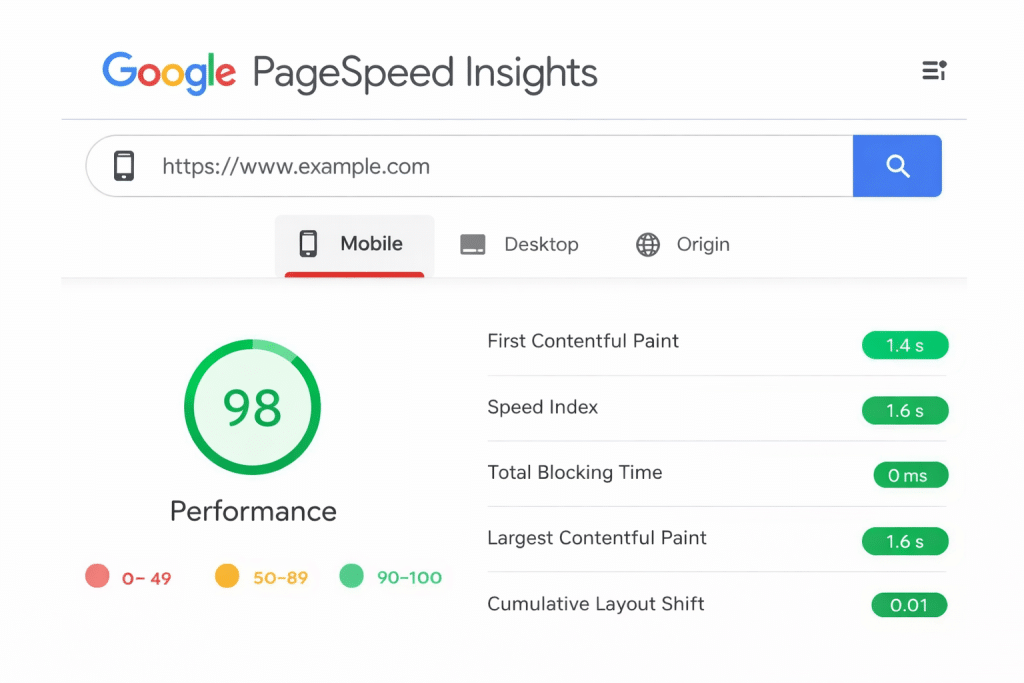
Page speed is a confirmed Google ranking factor, and slow pages drive visitors away before they even see your content. Research consistently shows that pages loading in under two seconds hold user attention significantly better than slower pages. Large uncompressed images, bloated code, and poor hosting are the most common culprits.
How to fix it: Compress images before uploading, enable browser caching, minimize CSS and JavaScript files, and evaluate your hosting provider’s performance. Use Google PageSpeed Insights to identify specific issues affecting your load times.
9. Neglecting Mobile Optimization
Google uses mobile-first indexing, meaning it primarily evaluates the mobile version of your site when determining rankings. A website that looks great on desktop but displays poorly on phones and tablets is at a significant disadvantage.
How to fix it: Test your pages on multiple mobile devices and screen sizes. Make sure text is readable without zooming, buttons are easy to tap, and content does not extend beyond the screen. Google’s Mobile-Friendly Test tool identifies specific problems.
10. Not Updating Old Content
Publishing content and never revisiting it is one of the most overlooked on-page SEO mistakes. Competitors publish newer, more thorough content. Statistics become outdated. Internal links break. Pages that ranked well 12 months ago can quietly slip to page two or beyond without regular maintenance.
How to fix it: Schedule content audits at least twice a year. Prioritize pages that have lost traffic or rankings. Update statistics, expand thin sections, refresh title tags and meta descriptions, and add internal links to newer content. A refreshed page often recovers lost rankings faster than a brand-new page would earn them.
Big Easy SEO provides comprehensive on-page SEO audits and optimization for businesses across Louisiana, Texas, California, Colorado, Mississippi, and Washington. Our team identifies every issue holding your site back and builds a prioritized plan to fix them. Call (504) 475-2049 or request your free analysis today.
Frequently Asked Questions About On-Page SEO Mistakes
How do I know if my website has on-page SEO problems?
Google Search Console is the best free starting point. It flags issues with title tags, mobile usability, indexing errors, and page experience. A professional SEO audit goes deeper by analyzing content quality, internal linking, keyword targeting, and technical factors.
Which on-page SEO mistake has the biggest impact on rankings?
Thin or low-quality content typically has the largest negative impact. Google prioritizes pages that provide genuine value and thorough topic coverage. A page with excellent title tags and fast load speed will still underperform if the content does not satisfy the searcher’s query.
Can I fix on-page SEO mistakes myself?
Business owners can address many of these issues, especially title tag updates, alt text additions, and content improvements. More technical fixes like page speed optimization, mobile rendering issues, and site-wide internal linking audits often benefit from professional expertise.
How long does it take to see results after fixing SEO mistakes?
Most improvements become visible in Google’s rankings within four to eight weeks after corrections are implemented and pages are recrawled. More competitive keywords may take longer to show movement.
Should I fix old pages or focus on creating new content?
Both matter, but fixing underperforming existing pages often delivers faster results. A page that already has some authority and indexed history can recover rankings more quickly than a brand-new page can earn them from scratch.